Improving Content Retrieval in IG Saved
User testing (6 interviews, 30 usability testers) improved retrieval speed by 88% and increased task success from 33% to 96%
ROLE
Product Designer
TIMELINE
4 Weeks
TEAM
Individual
RESPONSIBILITY
UX Research, Feature Ideation, Prototyping, Usability Testing, Interaction Design
ROLE
Product Designer
TEAM
Individual
TIMELINE
4 Weeks
RESPONSIBILITY
UX Research, Feature Ideation, Prototyping, Usability Testing, Interaction Design
Improving Content Retrieval in IG Saved
User testing (6 interviews, 30 usability testers) improved retrieval speed by 88% and increased task success from 33% to 96%
Overview
Overview
Using Instagram Saved frequently revealed how difficult it can be to find posts once they’ve been saved. What began as a personal frustration evolved into a broader investigation into why retrieval breaks down after saving.
This project explores how Saved could shift from a passive browsing feature to a retrieval-focused system. Through interviews, iterative prototyping, and usability testing, multiple approaches were developed and refined to improve clarity, structure, and access.
Using Instagram Saved frequently revealed how difficult it can be to find posts once they’ve been saved. What began as a personal frustration evolved into a broader investigation into why retrieval breaks down after saving.
This project explores how Saved could shift from a passive browsing feature to a retrieval-focused system. Through interviews, iterative prototyping, and usability testing, multiple approaches were developed and refined to improve clarity, structure, and access.
PRIMARY RESEARCH
Understanding Users
Understanding Users
Interviews focused on heavy Instagram savers who save posts 10+ times a week and manage multiple Saved collections, to understand how they organize content and where retrieval breaks down.
Interviews focused on heavy Instagram savers who save posts 10+ times a week and manage multiple Saved collections, to understand how they organize content and where retrieval breaks down.
“I remember the post, but I don’t remember where I saved it.”
“I remember the post, but I don’t remember where I saved it.”
"I end up opening multiple collections and scrolling forever."
"I end up opening multiple collections and scrolling forever."
"I save so many posts thinking I'll come back to them, but I never do because it takes forever to find anything. It's basically useless."
"I save so many posts thinking I'll come back to them, but I never do because it takes forever to find anything. It's basically useless."
Information Synthesis
Information Synthesis
Interview insights were mapped into a visual diagram to reveal patterns and key breakdowns before design.
Found 2 issues: Poor Discoverability and Lost Location
Interview insights were mapped into a visual diagram to reveal patterns and key breakdowns before design.
Found 2 issues: Poor Discoverability and Lost Location
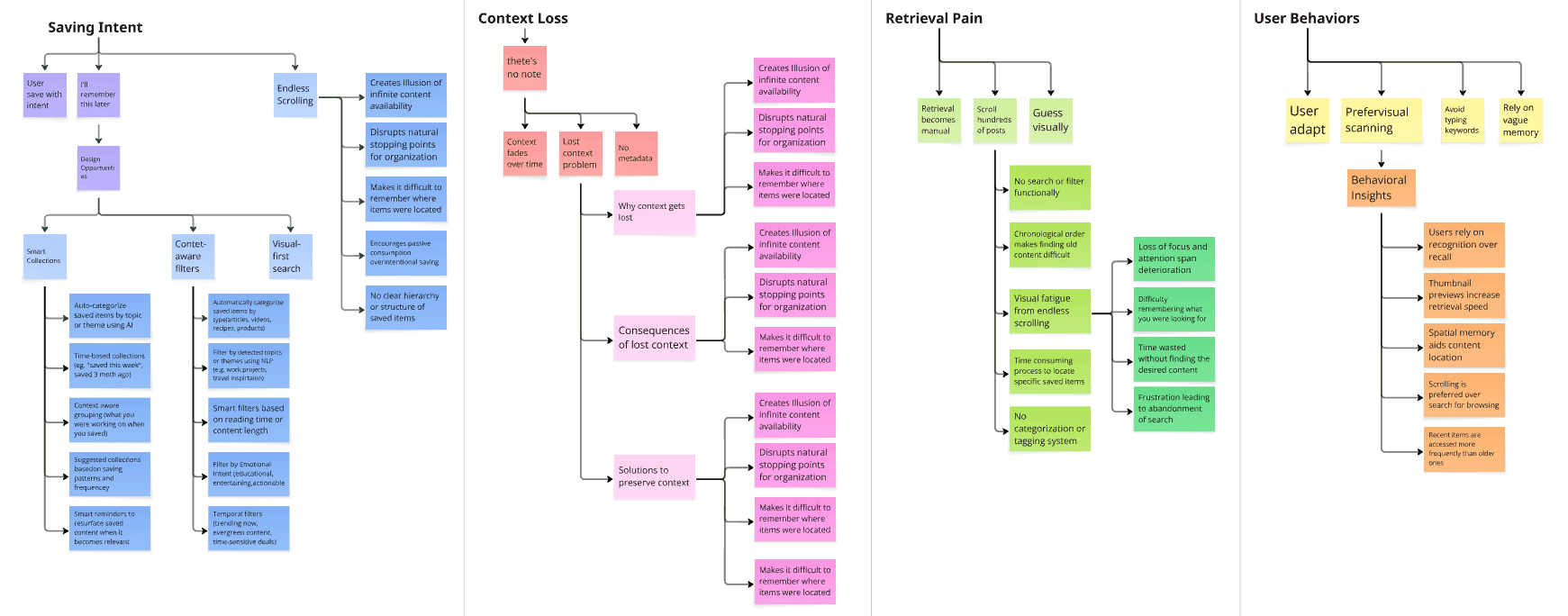
Takeaways from Interviews
Takeaways from Interviews
1. Users save with intent, but they can't remeber where they are.
2. Retrieval relies on visual scanning, not search.
3. Endless scrolling makes retrieval exhausting.
1. Users save with intent, but they can't remeber where they are.
2. Retrieval relies on visual scanning, not search.
3. Endless scrolling makes retrieval exhausting.
EARLY SOLUTION
Designing for Retrieval, not just Saving
Designing for Retrieval, not just Saving
Saved currently functions as a passive archive.
However, user behavior reveals a different intent — users treat it as a retrieval tool. After synthesizing interview insights and mapping breakdown points, the opportunity became clear: Reframe Saved as a retrieval-first system.
Rather than optimizing for saving volume, this redesign prioritizes clarity, recall, and structured access.
Saved currently functions as a passive archive.
However, user behavior reveals a different intent — users treat it as a retrieval tool. After synthesizing interview insights and mapping breakdown points, the opportunity became clear: Reframe Saved as a retrieval-first system.
Rather than optimizing for saving volume, this redesign prioritizes clarity, recall, and structured access.
Guiding Design Principles
Guiding Design Principles
1
Interviews
Interviews
Shift the system’s logic from collecting content to helping users find what they’ve already saved.
Shift the system’s logic from collecting content to helping users find what they’ve already saved.
2
Preserve context
Preserve context
Surface memory cues such as time, source, and intent to reduce reliance on vague recall.
Surface memory cues such as time, source, and intent to reduce reliance on vague recall.
3
Reduce cognitive load
Reduce cognitive load
Minimize endless scrolling and folder depth through filtering, grouping, and hierarchy.
Minimize endless scrolling and folder depth through filtering, grouping, and hierarchy.
4
Support visual scanning
Support visual scanning
Since users rely more on recognition than keywords, structure the interface around visual recall patterns.
Since users rely more on recognition than keywords, structure the interface around visual recall patterns.
Reframing the engagement metric
Reframing the engagement metric
Unlike traditional social features that optimize for time spent and infinite browsing, it intentionally reduces scrolling behavior and encourages faster exits. The goal is not increased engagement — but decreased friction.
Unlike traditional social features that optimize for time spent and infinite browsing, it intentionally reduces scrolling behavior and encourages faster exits. The goal is not increased engagement — but decreased friction.
FROM IDEAS TO WIREFRAMES
Wire-frame prototype
Wire-frame prototype
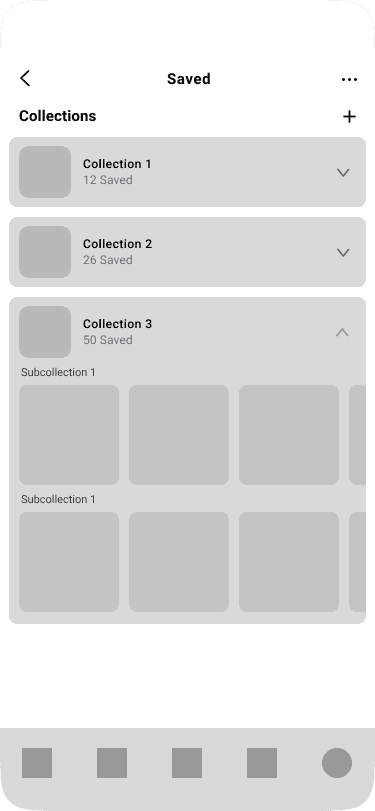
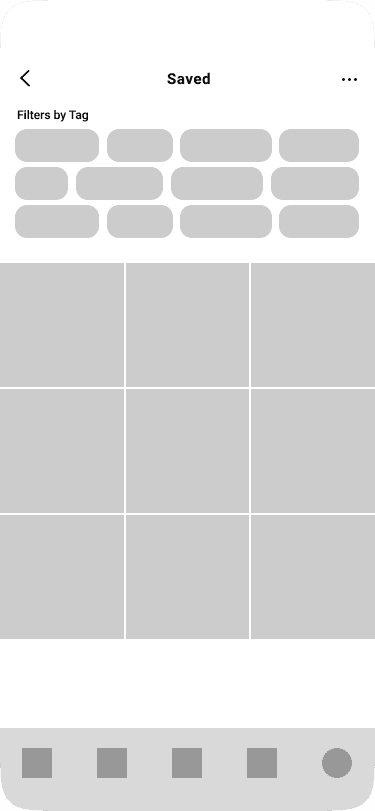
3 initial wireframe concepts were created and validated through feedback from the same 6 interview participants. To maintain visual familiarity and realistic interaction patterns, the wireframes were built using Instagram’s existing design system.
3 initial wireframe concepts were created and validated through feedback from the same 6 interview participants. To maintain visual familiarity and realistic interaction patterns, the wireframes were built using Instagram’s existing design system.

Early sketches
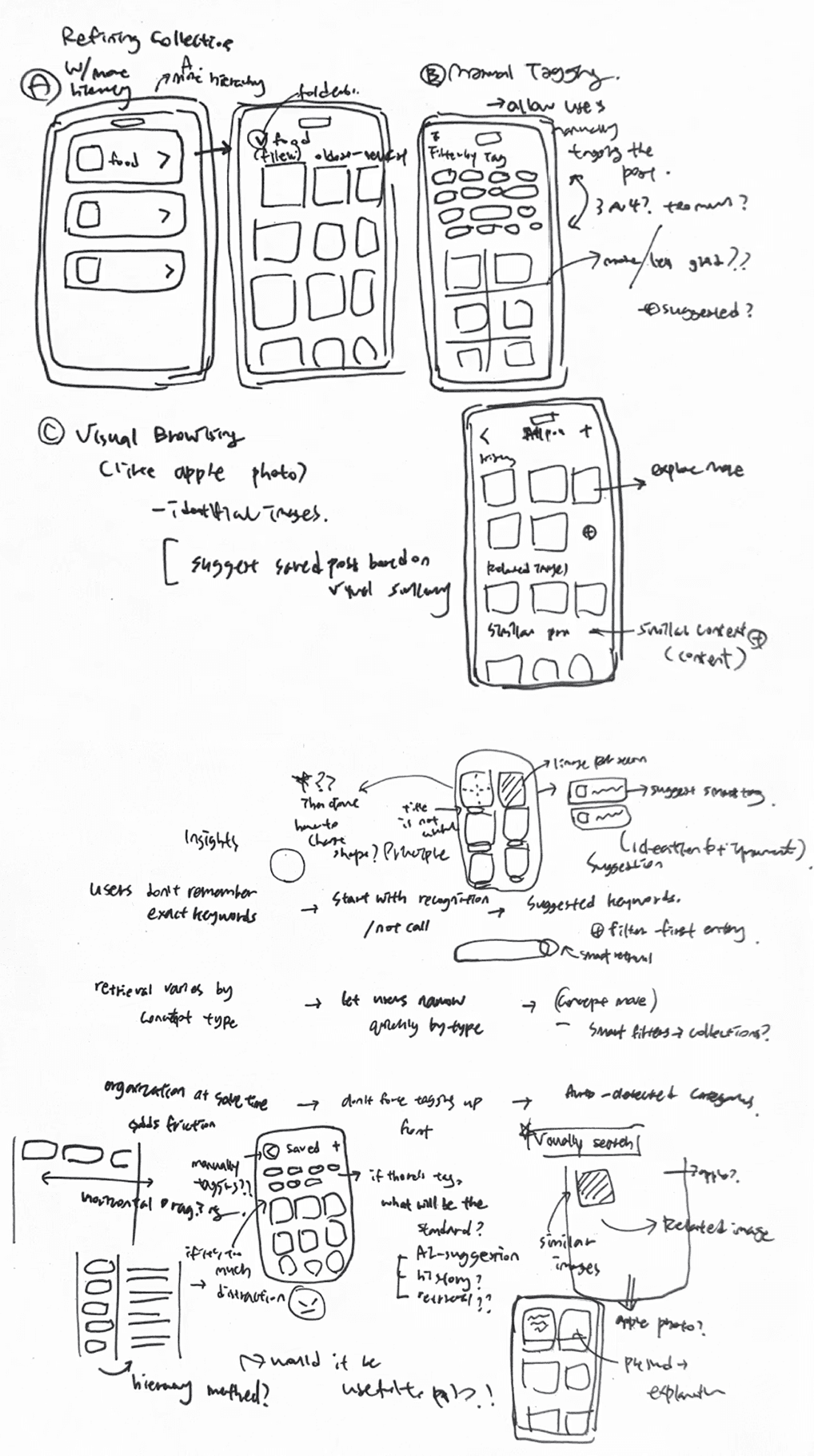
Early sketches were used to explore how the experience could support faster recall and reduce reliance on scrolling.
These focused on different ways to surface saved content through structure, filtering, and visual cues
Refining Collections
Extended the existing collection hierarchy.
While it provided clearer structure, deeper folder levels still relied heavily on users remembering where content was saved.
Manual Tagging
Introduced tag-based filtering to categorize saved posts.
While it improved organization, it required extra effort from users, making it less practical for everyday use.
Visual Browsing
Explored a visual discovery flow similar to Pinterest, where selecting a post reveals visually and thematically related content.
While it helped users rediscover content through visual similarity, it still lacked a direct way to intentionally retrieve a specific saved post.
Iteration Direction
Iteration Direction
User feedback pointed to search. Applying keyword-based search, similar to Apple Photos, enabled faster and more accurate retrieval of saved content.
User feedback pointed to search. Applying keyword-based search, similar to Apple Photos, enabled faster and more accurate retrieval of saved content.
Early sketches
Early sketches were used to explore how the experience could support faster recall and reduce reliance on scrolling.
These focused on different ways to surface saved content through structure, filtering, and visual cues
Refining Collections
Extended the existing collection hierarchy.
While it provided clearer structure, deeper folder levels still relied heavily on users remembering where content was saved.
Manual Tagging
Introduced tag-based filtering to categorize saved posts.
While it improved organization, it required extra effort from users, making it less practical for everyday use.
Visual Browsing
Explored a visual discovery flow similar to Pinterest, where selecting a post reveals visually and thematically related content.
While it helped users rediscover content through visual similarity, it still lacked a direct way to intentionally retrieve a specific saved post.
TESTING RETRIEVAL APPROACHES
Usability Testing Setup
Usability Testing Setup
To evaluate different retrieval approaches, a usability study was conducted in Maze. The current Saved experience (AS-IS) was recreated as a baseline, and participants completed the same retrieval task across 3systems, allowing a controlled comparison of speed, success rate, and confidence.
To evaluate different retrieval approaches, a usability study was conducted in Maze. The current Saved experience (AS-IS) was recreated as a baseline, and participants completed the same retrieval task across 3systems, allowing a controlled comparison of speed, success rate, and confidence.
1
1
AS-IS (Current Experience)
AS-IS (Current Experience)
Instagram’s existing browsing-based Saved experience.
Instagram’s existing browsing-based Saved experience.
2
2
TO-BE A — Search Only
TO-BE A — Search Only
A basic search interface allowing users to type keywords.
A basic search interface allowing users to type keywords.
3
3
TO-BE B — Search + Suggested Keywords
TO-BE B — Search + Suggested Keywords
Search supported by contextual keyword suggestions generated from saved content. The goal was to understand whether structured cues could improve retrieval beyond simple search.
Search supported by contextual keyword suggestions generated from saved content. The goal was to understand whether structured cues could improve retrieval beyond simple search.
Participants
Participants
Participants were regular Instagram users who frequently save posts and manage multiple Saved collections.
Participants were regular Instagram users who frequently save posts and manage multiple Saved collections.
30 Instagram users
30 Instagram users
Ages 18–40
Ages 18–40
United States
United States
Task Scenario
Task Scenario
Participants were given the same retrieval task across all three systems. This scenario reflects a common real-world use case where users remember content but not its location.
Participants were given the same retrieval task across all three systems. This scenario reflects a common real-world use case where users remember content but not its location.
You saved a pizza post earlier but can’t remember where it is. Find the saved post related to pizza.
You saved a pizza post earlier but can’t remember where it is. Find the saved post related to pizza.
Metrics Tracked
Metrics Tracked
The study focused on both performance and perception.
The study focused on both performance and perception.
1
Task success rate
Task success rate
Whether the user successfully found the post.
Whether the user successfully found the post.
2
Net Promoter Score (NPS)
Net Promoter Score (NPS)
How likely users were to recommend the retrieval experience.
How likely users were to recommend the retrieval experience.
3
Completion time
Completion time
How long it took to locate the saved item.
How long it took to locate the saved item.
4
Qualitative feedback
Qualitative feedback
Observations and comments during the task.
Observations and comments during the task.
VALIDATION
Results
Results
The baseline browsing system performed significantly worse than search-based approaches. While search improved completion time, the addition of suggested keywords produced the strongest results across all metrics.
The baseline browsing system performed significantly worse than search-based approaches. While search improved completion time, the addition of suggested keywords produced the strongest results across all metrics.
AS-IS
AS-IS
(Current)
(Current)
Avg. time
Avg. time
147s
147s
Success Rate
33%
Success Rate
33%
TO-BE A
TO-BE A
(Search Bar Only)
(Search Bar Only)
Avg. time
42s
Success Rate
65%
Avg. time
42s
Success Rate
65%
TO-BE B
TO-BE B
(Search + Suggested Keywords)
(Search + Suggested Keywords)
Avg. time
18s
Success Rate
96%
Avg. time
18s
Success Rate
96%
Key Outcomes
Key Outcomes
Participants reported feeling more certain about where to look when contextual keyword suggestions were provided.
Participants reported feeling more certain about where to look when contextual keyword suggestions were provided.
88%
88%
Faster Retrieval
147s → 18s
(88% faster vs current)
147s → 18s
(88% faster vs current)
Faster Retrieval
96%
96%
Task Success
33% → 96% success
33% → 96% success
Task Success
8.3
8.3
Confidence Rating
4.4/10 → 8.3/10
4.4/10 → 8.3/10
Confidence Rating
Selected Direction
Selected Direction
TO-BE B — Search + Suggested Keywords
TO-BE B — Search + Suggested Keywords
This approach was selected because it:
This approach was selected because it:
Improved task success
Reduced time-to-find
Increased user confidence
Improved task success
Reduced time-to-find
Increased user confidence
The results confirmed that recognition-based cues outperform memory-based browsing for retrieving saved content.
The results confirmed that recognition-based cues outperform memory-based browsing for retrieving saved content.
Iterating Based on User Testing
Iterating Based on User Testing
After identifying the winning retrieval model, the interface was refined based on the most common friction points observed during testing. The focus was on improving keyword visibility and ensuring suggestions felt intentional rather than incidental.
After identifying the winning retrieval model, the interface was refined based on the most common friction points observed during testing. The focus was on improving keyword visibility and ensuring suggestions felt intentional rather than incidental.
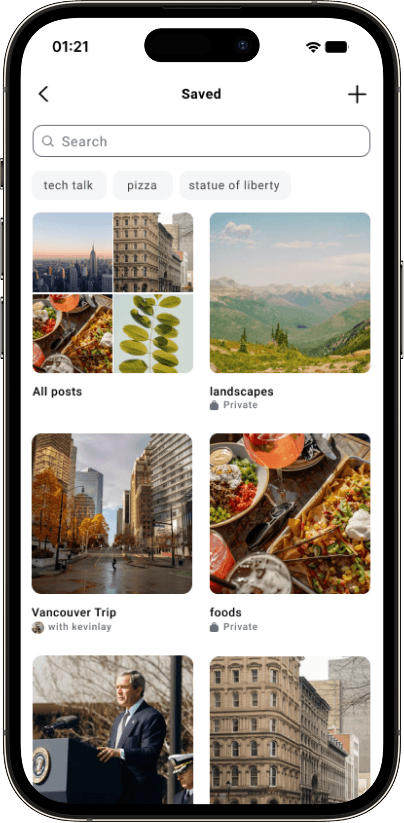
Before
Keyword Visibility
Keywords blended into the interface and felt similar to search history.
Keyword Personalization
Search history keywords were often unrelated to what users were trying to find.
✶ Users ignored keywords as "not useful"
After
Keyword Visibility
A "Suggested for you" label and accent color improved visibility and made the feature feel intentional.
Keyword Personalization
Suggestions were generated from recently saved posts and interaction history.
✶ Keywords felt relevant and useful
Keyword Visibility
Keywords blended into the interface and felt similar to search history.
Keyword Personalization
Search history keywords were often unrelated to what users were trying to find.
✶ Users ignored keywords as "not useful"
Before
Keyword Visibility
A "Suggested for you" label and accent color improved visibility and made the feature feel intentional.
Keyword Personalization
Suggestions were generated from recently saved posts and interaction history.
✶ Keywords felt relevant and useful
After
7.REFLECTION
What I learned
Start with the right problem
What began as a personal frustration turned out to be a shared pain point. Through Reddit discussions, 6 in-depth interviews with heavy Instagram users, and a usability test with 30 participants, I learned that retrieval breakdown was a common experience, not just my assumption.
Let research challenge your assumptions
User feedback pushed the project in a better direction than I initially imagined. Instead of focusing only on organization, interviews and testing revealed that users needed clearer search support and confidence cues during retrieval.
Better decisions come from evidence
Comparative usability testing and qualitative feedback helped me move forward with the most effective concept. This project reinforced that strong product direction comes from listening, measuring, and refining with real users.
Next Steps
Explore AI-powered recommendations
Use machine learning to surface saved content when it becomes relevant (e.g., suggesting saved recipes during dinner time).
Validate keyword personalization feasibility
Consult with engineers to explore the technical feasibility of generating “Suggested for you” keywords based on search history, saved content, and available metadata, and understand potential system limitations.
6.FEATURE EXPLORATION
Extending the Retrieval System
Extending the Retrieval System
With the core retrieval flow validated, additional features were explored to support deeper organization and faster discovery. These concepts expand the system while maintaining the retrieval-first principle.
With the core retrieval flow validated, additional features were explored to support deeper organization and faster discovery. These concepts expand the system while maintaining the retrieval-first principle.
Key Feature 1
Key Feature 1
Smart Filtering
Smart Filtering
Users can quickly narrow saved content by topic, type, or time period.
Users can quickly narrow saved content by topic, type, or time period.

Auto-detected categories
Auto-detected categories
No manual tagging required
No manual tagging required
Combinable filters
Combinable filters
Mix and match for precise results
Mix and match for precise results
Clear active states
Clear active states
Always know what's filtered
Always know what's filtered
Key Feature 2
Key Feature 2
Smart Collections
Smart Collections
Collections can be automatically generated based on content themes.
Collections can be automatically generated based on content themes.

Auto-generated collections
Auto-generated collections
Zero effort organization
Zero effort organization
Manual collections
Manual collections
For custom groupings
For custom groupings
Visual previews
Visual previews
See what's inside at a glance
See what's inside at a glance
Key Feature 3
Key Feature 3
Rich Context Preview
Rich Context Preview
Contextual previews help users recall saved content faster.
Contextual previews help users recall saved content faster.

Caption preview
Caption preview
Remember why you saved it
Remember why you saved it
Author & date
Author & date
Find by when or who
Find by when or who
Quick actions
Quick actions
Share, unsave, or add to collection
Share, unsave, or add to collection
7.REFLECTION
What I learned
Start with the right problem
What began as a personal frustration turned out to be a shared pain point. Through Reddit discussions, 6 in-depth interviews with heavy Instagram users, and a usability test with 30 participants, I learned that retrieval breakdown was a common experience, not just my assumption.
Let research challenge your assumptions
User feedback pushed the project in a better direction than I initially imagined. Instead of focusing only on organization, interviews and testing revealed that users needed clearer search support and confidence cues during retrieval.
Better decisions come from evidence
Comparative usability testing and qualitative feedback helped me move forward with the most effective concept. This project reinforced that strong product direction comes from listening, measuring, and refining with real users.
Next Steps